整理了一下之前GWT 的一些心得,放在我 site 中的 test1021 上裡面,
包含
檔案名稱 (概述)
----------------------------------------------------------------------------
GWT1 (GWT的簡介)
GWT2 Tutorial (包含安裝及實際撰寫應用程式的流程)
GWT Example分析 (列出範例檔所能學到的功能,其中 SimpleXML 有加以註解說明)
GWT-Eclip-Plugin (安裝Eclip 以及如何使用GWT在 Eclip)
GWT-pop Picture (一些圖形控制的特效,如移動時放大、跳出視窗的效果等)
所謂的GWT 就是 是讓 開發網頁應用程式的人 能夠使用 java來開發

2009年1月10日 星期六
轉貼 七個提供網路硬碟的API
標籤:
網路
The number of web service APIs for data storage in the cloud keeps growing. The latest entry comes from startup Nirvanix and you can see our Nirvanix API profile here. Nirvanix describes their storage services as an Internet Media File System (IMFS). It’s a fairly rich API with nearly 75 pages of documentation. Their API comes with reference applications (always a good idea for API providers) in PHP, Perl, Java, C# and interestingly Adobe AIR.
If you check our list of APIs tagged “storage” you can see there’s at least seven available at the moment. Your choices include:
* Amazon S3 API
* AOL Open Xdrive API
* Box.net API
* MoveDigital API
* Omnidrive API
* Openomy API
With offerings from Microsoft and Google due any time now, this will be become an even more heated market.
來源
http://blog.programmableweb.com/2007/09/06/7-online-storage-apis/
If you check our list of APIs tagged “storage” you can see there’s at least seven available at the moment. Your choices include:
* Amazon S3 API
* AOL Open Xdrive API
* Box.net API
* MoveDigital API
* Omnidrive API
* Openomy API
With offerings from Microsoft and Google due any time now, this will be become an even more heated market.
來源
http://blog.programmableweb.com/2007/09/06/7-online-storage-apis/
實用小軟體介紹
標籤:
實用小軟體
1. PicPick
介紹
PicPick是一個免費又好用的螢幕擷取軟體,它可以抓取全螢幕或是局部的畫面,而且操 作也很簡單,還具備了一般最常用到的基本圖像處理功能。
下載位址
http://picpick.wiziple.net/download
心得
蠻簡單實用的,抓下圖後可以裁減,還可以直接修改,加入文字
----------------------------------------------------------------------
2. handy hiRadio
介紹
handy hiRadio是一套免費的線上收音機軟體。它不但內建了很多台灣最受歡迎的廣播電台,而且體積嬌小操作簡單,還可以新增、編輯屬於自己的網路電台清單。
下載位址
http://toget.pchome.com.tw/intro/network_multimedia/25867_dl.html
心得
有很多台灣的電台,如中廣 ICRT 等等,新增電台的方式也很簡單,如圖

以上軟體介紹來至pchome
介紹
PicPick是一個免費又好用的螢幕擷取軟體,它可以抓取全螢幕或是局部的畫面,而且操 作也很簡單,還具備了一般最常用到的基本圖像處理功能。
下載位址
http://picpick.wiziple.net/download
心得
蠻簡單實用的,抓下圖後可以裁減,還可以直接修改,加入文字
----------------------------------------------------------------------
2. handy hiRadio
介紹
handy hiRadio是一套免費的線上收音機軟體。它不但內建了很多台灣最受歡迎的廣播電台,而且體積嬌小操作簡單,還可以新增、編輯屬於自己的網路電台清單。
下載位址
http://toget.pchome.com.tw/intro/network_multimedia/25867_dl.html
心得
有很多台灣的電台,如中廣 ICRT 等等,新增電台的方式也很簡單,如圖

以上軟體介紹來至pchome
2009年1月7日 星期三
HTML的子母網頁溝通 (window open and opener)
標籤:
google api,
javascript
在javascript下可以利用 window.open 開啟新網頁
而 window.opener 的語法可以取得母網頁的變數加以控制
以下一個範例說明
此範例結合google feeds api ,功用大致是 取得google news 的 rss 點選文字可 在新網頁開啟;
在新視窗內使用母網頁的資料,可以操作上下篇新聞的切換
DEMO 圖 1 子母網頁

DEMO 圖 2 下一頁

+++++++++++++++++++++++++++++++++++++++
子網頁 News.html
+++++++++++++++++++++++++++++++++++++++
---------------------------------------------------------
script 部分
---------------------------------------------------------
var Information=window.opener.News;
//var idx=Information.Info.idx;
var idx=Information.num;
function load()
{
getInformation(idx);
}
function getInformation(Index){
document.getElementById("Title").innerHTML=Information.Info.title
[Index];
//check final content
var subNewsLength=Information.Info.content[Index].length-1; //
length of sub news
var lastWord=Information.Info.content[Index].charAt
(subNewsLength); //last word
//alert(lastWord)
if (lastWord != "!" && lastWord != "." && lastWord != "。" )
Information.Info.content[Index]+=("...");
document.getElementById("Content").innerHTML=Information.Info.content
[Index];
}
function NextNews(){
if (idx==Information.Info.title.length-1)
idx=0;
else
idx++;
getInformation(idx);
}
function PreNews(){
if (idx==0)
idx=Information.Info.title.length-1;
else
idx--;
getInformation(idx);
}
---------------------------------------------------------
body部分
---------------------------------------------------------
<body onload= "load()" >
<div id="Title" >Test </div>
<div id="Content" >load... </div>
<table id="ConTable" style="text-align: left; width: 90%; height:
30px;" border="0" cellpadding="2" cellspacing="2">
<tbody><tr>
<td style="width: 100px;">
<input id="before" value="Prev" onclick="PreNews()" type="button" /></
td>
<td style="width: 100px;">
<input id="Nxet" value="Nxet" onclick="NextNews()" type="button" /> </
td>
</tr>
</tbody>
</table>
</body>
+++++++++++++++++++++++++++++++++++++++
母網頁 index.html
+++++++++++++++++++++++++++++++++++++++
---------------------------------------------------------
script 部分
---------------------------------------------------------
google.load('feeds', '1'); //必須加入google account
var News =new Object();
News.num=0;
News.Info= function(){
News.Info.idx=0;
News.Info.title=[];
News.Info.content=[];
News.Info.img=[];
}
// different country have different news rss length
// 針對不同國家所提供RSS 新聞數量不同
// 舉例來說 大陸 136 筆 台灣 26 筆
// 所以要新設定,否則都會讀到大陸的新聞
// 以切換到台灣為例 只更新到前面的26筆 ,後面扔是大陸的新聞
News.ClearInfo = function(){
News.Info.idx=0;
News.Info.title=[];
News.Info.content=[];
News.Info.img=[];
}
News.SetIdxInfo=function(idx){
News.Info.idx=idx;
}
News.SetTitleInfo=function(idx,Title){
News.Info.title[idx]=Title;
}
News.SetContentInfo=function(idx,content){
News.Info.content[idx]=content;
}
News.SetImgInfo=function(idx,img){
News.Info.img[idx]=img;
}
News.GetIdxInfo=function(){ return
News.Info.idx; }
News.GetTitleInfoByIdx=function(idx){ return News.Info.title
[idx]; }
News.GetContentInfoByIdx=function(idx){ return News.Info.content
[idx]; }
News.GetImgInfoByIdx=function(idx){ return News.Info.img
[idx]; }
News.CallApi=function(){
News.url = 'http://news.google.com.tw/news?output=rss&ned=tw'
var feed = new google.feeds.Feed(News.url); // default in JSON
mode
//feed.setResultFormat(google.feeds.Feed.XML_FORMAT);
feed.setNumEntries(1000); //1000=20 因為最大數就是20筆 要更多要做其他設定
feed.load(News.parseNews);
}// end of News.CallApi
News.parseNews=function(res){
if (res.error) { return; }
News.ClearInfo();
for (var i=0; i<res.feed.entries.length; i++) {
// record title
var tempTitle = res.feed.entries[i].title.replace(/-.*/,
"");
News.SetTitleInfo(i,tempTitle);
var desc = res.feed.entries[i].content;
var src = desc.substring(desc.indexOf('img src="')+9);
var tempImg=src.substring(0, src.indexOf('" width='));
News.SetImgInfo(i,tempImg);
// replace 語法 / 中間是要replace的地方 /
// \. -> .
// \/ -> /
// <b>\.\.\.<\/b> = <b>...</b>
// .* -> 所有的
desc = desc.replace(/<b>\.\.\.<\/b>.*/, ''); // 把<b>...</
b>以後的字串取代為" "
desc = desc.replace(/\.<\/font>.*/, '');
desc = desc.replace(/.*>/, '');
News.SetContentInfo(i,desc);
}//end of for
News.Show();
}//end of News.parseNews
News.Show= function(){
document.getElementById("news").innerHTML= "<P class=
\"newsWords\">"+
"<a onClick=\"OpenNewsWindow(News,News.GetIdxInfo())\">"+
News.GetTitleInfoByIdx(News.GetIdxInfo())+"</a>"+"</p>";
} //end of News.show
News.Hide=function(){
document.getElementById("news").innerHTML="";
}
function OpenNewsWindow(News,i){
var Title= News.GetTitleInfoByIdx(i);
News.num=i;
subWindows=window.open
('News.html',Title,'width=400,height=200,location=no,toolbar=no,titlebar=no,state=no,modal=yes,screenY=200');
}
function Init(){
News.CallApi();
}
---------------------------------------------------------
body部分
---------------------------------------------------------
<body onload="Init()" onunload="GUnload()" >
<div id="news" name="news" >load... </div>
而 window.opener 的語法可以取得母網頁的變數加以控制
以下一個範例說明
此範例結合google feeds api ,功用大致是 取得google news 的 rss 點選文字可 在新網頁開啟;
在新視窗內使用母網頁的資料,可以操作上下篇新聞的切換
DEMO 圖 1 子母網頁

DEMO 圖 2 下一頁

+++++++++++++++++++++++++++++++++++++++
子網頁 News.html
+++++++++++++++++++++++++++++++++++++++
---------------------------------------------------------
script 部分
---------------------------------------------------------
var Information=window.opener.News;
//var idx=Information.Info.idx;
var idx=Information.num;
function load()
{
getInformation(idx);
}
function getInformation(Index){
document.getElementById("Title").innerHTML=Information.Info.title
[Index];
//check final content
var subNewsLength=Information.Info.content[Index].length-1; //
length of sub news
var lastWord=Information.Info.content[Index].charAt
(subNewsLength); //last word
//alert(lastWord)
if (lastWord != "!" && lastWord != "." && lastWord != "。" )
Information.Info.content[Index]+=("...");
document.getElementById("Content").innerHTML=Information.Info.content
[Index];
}
function NextNews(){
if (idx==Information.Info.title.length-1)
idx=0;
else
idx++;
getInformation(idx);
}
function PreNews(){
if (idx==0)
idx=Information.Info.title.length-1;
else
idx--;
getInformation(idx);
}
---------------------------------------------------------
body部分
---------------------------------------------------------
<body onload= "load()" >
<div id="Title" >Test </div>
<div id="Content" >load... </div>
<table id="ConTable" style="text-align: left; width: 90%; height:
30px;" border="0" cellpadding="2" cellspacing="2">
<tbody><tr>
<td style="width: 100px;">
<input id="before" value="Prev" onclick="PreNews()" type="button" /></
td>
<td style="width: 100px;">
<input id="Nxet" value="Nxet" onclick="NextNews()" type="button" /> </
td>
</tr>
</tbody>
</table>
</body>
+++++++++++++++++++++++++++++++++++++++
母網頁 index.html
+++++++++++++++++++++++++++++++++++++++
---------------------------------------------------------
script 部分
---------------------------------------------------------
google.load('feeds', '1'); //必須加入google account
var News =new Object();
News.num=0;
News.Info= function(){
News.Info.idx=0;
News.Info.title=[];
News.Info.content=[];
News.Info.img=[];
}
// different country have different news rss length
// 針對不同國家所提供RSS 新聞數量不同
// 舉例來說 大陸 136 筆 台灣 26 筆
// 所以要新設定,否則都會讀到大陸的新聞
// 以切換到台灣為例 只更新到前面的26筆 ,後面扔是大陸的新聞
News.ClearInfo = function(){
News.Info.idx=0;
News.Info.title=[];
News.Info.content=[];
News.Info.img=[];
}
News.SetIdxInfo=function(idx){
News.Info.idx=idx;
}
News.SetTitleInfo=function(idx,Title){
News.Info.title[idx]=Title;
}
News.SetContentInfo=function(idx,content){
News.Info.content[idx]=content;
}
News.SetImgInfo=function(idx,img){
News.Info.img[idx]=img;
}
News.GetIdxInfo=function(){ return
News.Info.idx; }
News.GetTitleInfoByIdx=function(idx){ return News.Info.title
[idx]; }
News.GetContentInfoByIdx=function(idx){ return News.Info.content
[idx]; }
News.GetImgInfoByIdx=function(idx){ return News.Info.img
[idx]; }
News.CallApi=function(){
News.url = 'http://news.google.com.tw/news?output=rss&ned=tw'
var feed = new google.feeds.Feed(News.url); // default in JSON
mode
//feed.setResultFormat(google.feeds.Feed.XML_FORMAT);
feed.setNumEntries(1000); //1000=20 因為最大數就是20筆 要更多要做其他設定
feed.load(News.parseNews);
}// end of News.CallApi
News.parseNews=function(res){
if (res.error) { return; }
News.ClearInfo();
for (var i=0; i<res.feed.entries.length; i++) {
// record title
var tempTitle = res.feed.entries[i].title.replace(/-.*/,
"");
News.SetTitleInfo(i,tempTitle);
var desc = res.feed.entries[i].content;
var src = desc.substring(desc.indexOf('img src="')+9);
var tempImg=src.substring(0, src.indexOf('" width='));
News.SetImgInfo(i,tempImg);
// replace 語法 / 中間是要replace的地方 /
// \. -> .
// \/ -> /
// <b>\.\.\.<\/b> = <b>...</b>
// .* -> 所有的
desc = desc.replace(/<b>\.\.\.<\/b>.*/, ''); // 把<b>...</
b>以後的字串取代為" "
desc = desc.replace(/\.<\/font>.*/, '');
desc = desc.replace(/.*>/, '');
News.SetContentInfo(i,desc);
}//end of for
News.Show();
}//end of News.parseNews
News.Show= function(){
document.getElementById("news").innerHTML= "<P class=
\"newsWords\">"+
"<a onClick=\"OpenNewsWindow(News,News.GetIdxInfo())\">"+
News.GetTitleInfoByIdx(News.GetIdxInfo())+"</a>"+"</p>";
} //end of News.show
News.Hide=function(){
document.getElementById("news").innerHTML="";
}
function OpenNewsWindow(News,i){
var Title= News.GetTitleInfoByIdx(i);
News.num=i;
subWindows=window.open
('News.html',Title,'width=400,height=200,location=no,toolbar=no,titlebar=no,state=no,modal=yes,screenY=200');
}
function Init(){
News.CallApi();
}
---------------------------------------------------------
body部分
---------------------------------------------------------
<body onload="Init()" onunload="GUnload()" >
<div id="news" name="news" >load... </div>
How to Set porxy, port in java
由於一般公司的 proxy 會擋住一些對外的網路訊息,但是一般80 port 都可以使用 ,所以利用 80 port 傳送和取得資料,以利能利用google 的網路服務
大致要做兩個設定
1. 查詢proxy server Name
1-1 Enter DOS
(開始->執行->cmd)
1-2 Enter Netstate 以查詢server Name
(公司的proxy server Name: EX proxy.XXXX.corp)
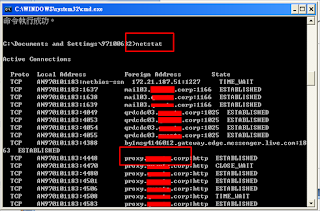
2. Setting
2-1 import java.util.Properties
2-2 Add code
Properties systemSettings = System.getProperties();
systemSettings.put("http.proxyHost",
"myProxyServer.com");
myProxyServer.com
要取代為剛查詢 的 proxy server name
systemSettings.put("http.proxyPort", "80");
Set port 80 的原因是在一般狀況 80是 可以通的
Reference
Dos網路指令
http://www.pczone.com.tw/vbb3/archive/t-17870.html
Java proxy 設定
http://www.rgagnon.com/javadetails/java-0085.html
Java with google api
http://code.google.com/intl/zh-TW/apis/gdata/articles/eclipse.html
以下是兩個java 的範例
Example 1
輸入網址取得html的編碼
Example 2
取得google document 的文件列表
Example 1
-------------------------------------------------------------------------------------
import java.net.*;
import java.io.*;
import java.util.Properties;
public class URLUtils {
public static void main(String s[]) {
URLUtils.dump("http://www.yahoo.com");
System.out.println("**************");
URLUtils.dump("http://www.google.com");
System.out.println("**************");
}
public static void dump(String URLName){
try {
DataInputStream di = null;
FileOutputStream fo = null;
byte [] b = new byte[1];
// PROXY
Properties systemSettings = System.getProperties();
systemSettings.put("http.proxyHost","proxy.XXXX.corp") ;
systemSettings.put("http.proxyPort", "80") ;
URL u = new URL(URLName);
HttpURLConnection con = (HttpURLConnection) u.openConnection();
//
// it's not the greatest idea to use a sun.misc.* class
// Sun strongly advises not to use them since they can
// change or go away in a future release so beware.
//
sun.misc.BASE64Encoder encoder = new sun.misc.BASE64Encoder();
String encodedUserPwd =
encoder.encode("mydomain\\MYUSER:MYPASSWORD".getBytes());
con.setRequestProperty
("Proxy-Authorization", "Basic " + encodedUserPwd);
// PROXY ----------
di = new DataInputStream(con.getInputStream());
while(-1 != di.read(b,0,1)) {
System.out.print(new String(b));
}
}
catch (Exception e) {
e.printStackTrace();
}
}
}
-------------------------------------------------------------------------------------
Example 2 修改帳號密碼才能RUN
-------------------------------------------------------------------------------------
import java.net.URL;
import java.util.Properties;
import com.google.gdata.client.docs.DocsService;
import com.google.gdata.data.docs.DocumentListEntry;
import com.google.gdata.data.docs.DocumentListFeed;
public class TsetDocumentList {
public static void main(String[] args) {
Properties systemSettings = System.getProperties();
systemSettings.put("proxyPort","80");
systemSettings.put("proxyHost","proxy.XXXXX.corp");
//System.out.println("using proxy: "+ System.getProperties() );
try{
DocsService service = new DocsService("Document List Demo");
service.setUserCredentials("XXXXXXX...@gmail.com", "yourCode");
//service.setUserCredentials( yourAccount, yourCode);
URL documentListFeedUrl= new
URL("http://docs.google.com/feeds/documents/private/full");
DocumentListFeed feed = service.getFeed(documentListFeedUrl,
DocumentListFeed.class);
for (DocumentListEntry entry : feed.getEntries()){
System.out.println(entry.getTitle().getPlainText());
}
}
catch(Exception ex){
System.err.println("Expection:"+ex.getMessage());
大致要做兩個設定
1. 查詢proxy server Name
1-1 Enter DOS
(開始->執行->cmd)
1-2 Enter Netstate 以查詢server Name
(公司的proxy server Name: EX proxy.XXXX.corp)

2. Setting
2-1 import java.util.Properties
2-2 Add code
Properties systemSettings = System.getProperties();
systemSettings.put("http.proxyHost",
"myProxyServer.com");
myProxyServer.com
要取代為剛查詢 的 proxy server name
systemSettings.put("http.proxyPort", "80");
Set port 80 的原因是在一般狀況 80是 可以通的
Reference
Dos網路指令
http://www.pczone.com.tw/vbb3/archive/t-17870.html
Java proxy 設定
http://www.rgagnon.com/javadetails/java-0085.html
Java with google api
http://code.google.com/intl/zh-TW/apis/gdata/articles/eclipse.html
以下是兩個java 的範例
Example 1
輸入網址取得html的編碼
Example 2
取得google document 的文件列表
Example 1
-------------------------------------------------------------------------------------
import java.net.*;
import java.io.*;
import java.util.Properties;
public class URLUtils {
public static void main(String s[]) {
URLUtils.dump("http://www.yahoo.com");
System.out.println("**************");
URLUtils.dump("http://www.google.com");
System.out.println("**************");
}
public static void dump(String URLName){
try {
DataInputStream di = null;
FileOutputStream fo = null;
byte [] b = new byte[1];
// PROXY
Properties systemSettings = System.getProperties();
systemSettings.put("http.proxyHost","proxy.XXXX.corp") ;
systemSettings.put("http.proxyPort", "80") ;
URL u = new URL(URLName);
HttpURLConnection con = (HttpURLConnection) u.openConnection();
//
// it's not the greatest idea to use a sun.misc.* class
// Sun strongly advises not to use them since they can
// change or go away in a future release so beware.
//
sun.misc.BASE64Encoder encoder = new sun.misc.BASE64Encoder();
String encodedUserPwd =
encoder.encode("mydomain\\MYUSER:MYPASSWORD".getBytes());
con.setRequestProperty
("Proxy-Authorization", "Basic " + encodedUserPwd);
// PROXY ----------
di = new DataInputStream(con.getInputStream());
while(-1 != di.read(b,0,1)) {
System.out.print(new String(b));
}
}
catch (Exception e) {
e.printStackTrace();
}
}
}
-------------------------------------------------------------------------------------
Example 2 修改帳號密碼才能RUN
-------------------------------------------------------------------------------------
import java.net.URL;
import java.util.Properties;
import com.google.gdata.client.docs.DocsService;
import com.google.gdata.data.docs.DocumentListEntry;
import com.google.gdata.data.docs.DocumentListFeed;
public class TsetDocumentList {
public static void main(String[] args) {
Properties systemSettings = System.getProperties();
systemSettings.put("proxyPort","80");
systemSettings.put("proxyHost","proxy.XXXXX.corp");
//System.out.println("using proxy: "+ System.getProperties() );
try{
DocsService service = new DocsService("Document List Demo");
service.setUserCredentials("XXXXXXX...@gmail.com", "yourCode");
//service.setUserCredentials( yourAccount, yourCode);
URL documentListFeedUrl= new
URL("http://docs.google.com/feeds/documents/private/full");
DocumentListFeed feed = service.getFeed(documentListFeedUrl,
DocumentListFeed.class);
for (DocumentListEntry entry : feed.getEntries()){
System.out.println(entry.getTitle().getPlainText());
}
}
catch(Exception ex){
System.err.println("Expection:"+ex.getMessage());
訂閱:
文章 (Atom)